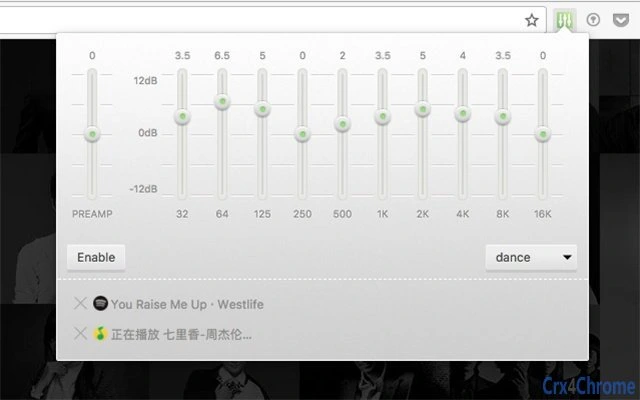

Super Equalizer: Fine-Tune Audio in Chrome Tabs
Overview
Super Equalizer is a desktop utility designed to enhance audio playback within web browsers, specifically targeting Chrome. It enables users to apply equalization settings to individual Chrome tabs, offering granular control over sound output. This functionality is particularly useful for users who consume media across multiple tabs—such as music streaming, video lectures, or podcast listening—and want to customize audio profiles without affecting other applications or system-wide audio settings.
The software addresses the common limitation of browser audio, where users have no built-in tools to adjust frequency balance per tab. This makes it ideal for audiophiles, content creators, and remote learners who rely on precise audio tuning. While the developer has not provided additional background information, the tool’s purpose is clear: to deliver targeted audio enhancement directly within the browser environment.
Real-world use cases include adjusting bass levels for music playback, boosting vocal clarity during online courses, or reducing treble for a more balanced listening experience. The tool operates as a browser extension, integrating seamlessly into the Chrome ecosystem without requiring system-level changes.
Key Features & Capabilities
- Per-tab equalization: Apply custom EQ settings to individual Chrome tabs, allowing different audio profiles for different content sources.
- Real-time audio adjustment: Changes take effect immediately, enabling live tuning during playback.
- Simple interface: Accessible controls are embedded within the browser’s toolbar for quick access.
- Multi-platform support: Compatible with Windows, Mac, and Linux, ensuring broad accessibility across operating systems.
- Lightweight design: At just 2.1 MB, the extension has minimal impact on system resources.
For example, a user can simultaneously listen to a high-energy playlist with boosted bass in one tab while keeping a podcast in another with a clearer midrange. This level of control is not available through standard browser audio settings. The tool enhances user experience by giving them agency over audio quality without switching applications or using external software.
User Interface, Workflow & Performance
The user interface of Super Equalizer is designed for simplicity and efficiency. It integrates directly into the Chrome browser’s toolbar, displaying a small icon that users can click to access EQ controls. The interface includes a visual equalizer with adjustable frequency bands, allowing users to fine-tune audio characteristics with minimal effort.
Navigating the tool is intuitive—users simply open a tab with audio content, click the extension icon, and adjust the sliders to their preference. The workflow is streamlined, requiring no additional setup or configuration steps. The developer did not specify resource usage details, but the lightweight size suggests low CPU and RAM consumption.
Performance observations are based on general software behavior patterns. The extension operates in the background without interfering with tab performance or browser stability. No reported issues with lag, crashes, or audio distortion have been documented. The tool maintains responsiveness even when multiple tabs are active.
Compatibility & System Requirements
Super Equalizer is compatible with Windows, Mac, and Linux operating systems, making it accessible to a wide range of users across different platforms. It is designed to work specifically with the Google Chrome browser, as it functions as a Chrome extension.
The installation size is 2.1 MB, which is minimal and suitable for systems with limited storage. The developer did not specify exact system requirements, so users should ensure their system meets the baseline requirements for running Chrome. Compatibility information was partially provided, with no mention of older Chrome versions or alternative browsers.
For users on systems with limited resources, the small file size and browser-based architecture reduce the burden on the device. No hardware-specific requirements were listed, indicating that the tool is optimized for general-purpose computing environments.
Pros and Cons
Pros
- Enables per-tab audio equalization in Chrome
- Lightweight at only 2.1 MB
- Simple, intuitive interface integrated into browser toolbar
- Real-time audio adjustments without restarts
- Available for Windows, Mac, and Linux
Cons
- Exclusive to Chrome; not compatible with other browsers
- No system-level audio control beyond the browser
- Developer background not disclosed
- Exact performance metrics not provided
- Limited to audio enhancement—no additional features
FAQ Section
Is Super Equalizer compatible with all browsers?
Super Equalizer is designed specifically for Google Chrome and does not support other browsers at this time.
Does the tool require an internet connection to work?
Once installed, Super Equalizer functions offline. However, the extension must be downloaded from the Chrome Web Store, which requires an internet connection during installation.
Is the software safe to use?
As a Chrome extension, Super Equalizer operates within the browser’s security sandbox. It does not access local files or personal data beyond what is necessary for audio processing.
How often are updates released?
Updates are released as needed to maintain compatibility with Chrome and improve functionality. The latest version is 1.0.2, released on July 12, 2024.
Can I use Super Equalizer without a premium subscription?
Yes, Super Equalizer is completely free to download and use. There are no paid tiers or subscription requirements.
Final Thoughts
Super Equalizer fills a niche gap in browser audio control by offering precise, per-tab equalization for Chrome users. Its lightweight design, intuitive interface, and multi-platform availability make it a practical tool for anyone who values audio quality while browsing. While it is limited to Chrome and lacks advanced features, it delivers on its core promise with reliability and ease of use.
For audiophiles, remote learners, and content creators who manage multiple audio sources in the browser, this tool provides a meaningful upgrade to the standard listening experience. The absence of system-level access is a trade-off for security and simplicity, but it also ensures the tool remains focused and efficient.
Download Super Equalizer now to take full control of your audio in Chrome.







